Manage stopword lists
Open Settings → Stopwords to manage common-word lists for each language. These lists help File Index decide which repeated expressions to include. A stopword setting changes term extraction; it leaves the words in your document unchanged.
Key points
The language's default stopword list helps decide which expressions File Index can include. First, Inside, and Last set permitted positions within a candidate term. Changing the list does not remove words from your document.
Choose the list used for a language
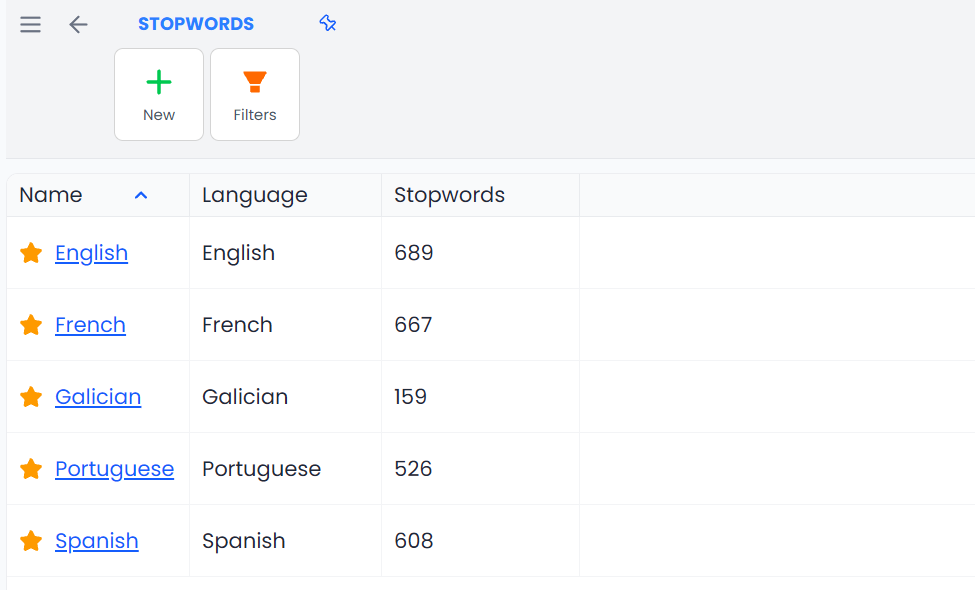
The library can hold several lists for one language, but analysis uses that language's current default. A star identifies the effective default. Use Set as default on the intended list; opening a list alone does not make it active.
Use Clone when you want to adjust a copy of a supplied list. After cloning, review the offered default-selection prompt. A newly saved custom list does not replace another current default merely because it exists.
Lists are chosen by base language: regional varieties of one language use the same stopword list. Available starter lists can be loaded for working languages; read loading errors rather than assuming the list is complete.
Create or edit a stopword list
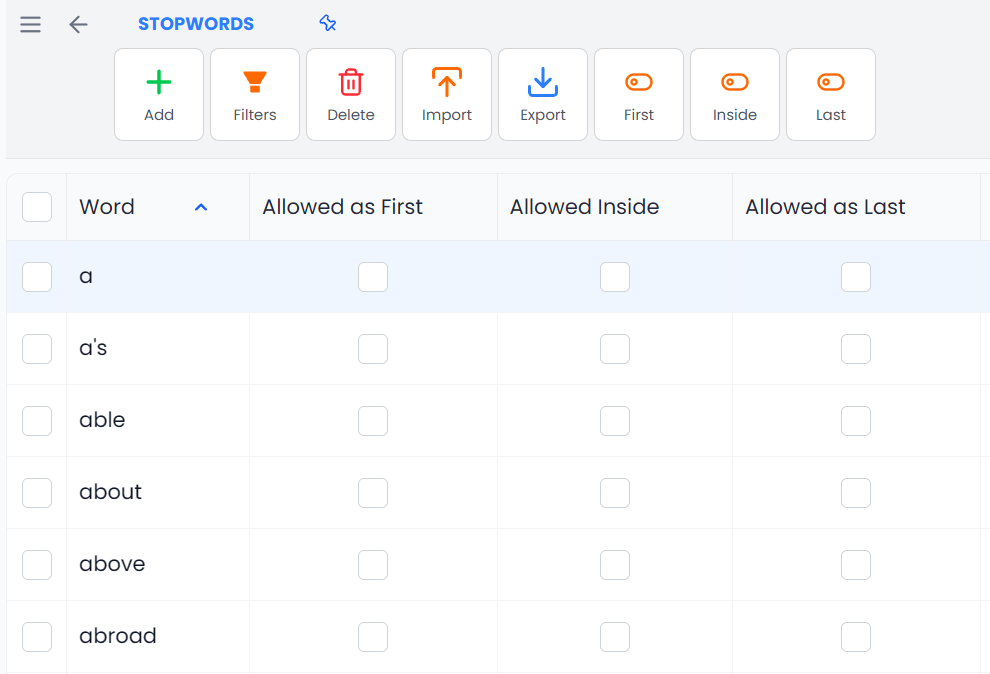
Choose New, give the list a name, select its language, and optionally add a description. Add words by pasting text or importing a supported resource. Review the generated word rows and their position flags, then save the resource.
Pasted text is split into individual words; it is not stored as a set of complete sentences or multiword forbidden phrases. Check the extracted list before saving. Newly created words can start with all position permissions off unless an existing language entry supplies them.
Use Edit in the library to change resource properties. Open the resource to maintain its word rows. A word's text is not an ordinary editable term cell here; to correct its spelling, remove the entry and add the corrected word.
Understand First, Inside, and Last
These checkboxes are permissions, not labels saying that every occurrence must occupy that position:
| Flag | Meaning in the candidate-term analysis |
|---|---|
| First | Allows a candidate expression to start with this word |
| Inside | Allows analysis to continue across this word as a connector inside a longer expression |
| Last | Allows this word at the end of a candidate expression |
For example, a connector such as “of” can be allowed Inside while disallowed as First, so analysis can consider a longer expression without starting candidates at that connector. This affects candidate construction, not the words retained in the document.
During candidate construction, Inside lets the analyzer continue across a connector. The completed expression is then checked against its actual first, inside, and last word permissions. Inside does not override a disallowed ending. A listed stopword is also not retained as a standalone one-word Index candidate merely because First is enabled.
Other relevance, repetition, and length rules still apply. Enabling a position does not guarantee that an expression will appear in the File Index.
Change one word or the whole list
A row checkbox or its Toggle First/Inside/Last context action changes that individual word and saves the list. There is no translation-style Confirm step for these checkbox edits.
The ribbon's First, Inside, and Last commands act on the whole open list, regardless of selection or text filters. If every word already allows that position, the command offers to disable it for all. Otherwise it offers to enable it for all. Read the confirmation's list count.
Do not select two words and assume a ribbon position command changes only those two. Use their individual checkboxes when you want a small correction.
Search, select, and delete
Show Filters to search the word list and use its matching options or opposite condition. Clearing the search restores the word table; it does not remove entries.
Select word rows before using the ribbon Delete action. A row's Delete context action removes that word. These are saved list changes, so export the relevant resource before a large maintenance pass if you need a recoverable copy.
The library prevents deletion of the effective default list. Choose another default first when you intend to remove the old resource.
Import and export
Import accepts supported memoQ .mqres stopword resources. It checks the resource language against the open list. Import into an existing list adds/replaces the supplied word entries while retaining other entries; it does not clear the entire list first.
Export from the open table uses selected words if any are selected, and otherwise the whole list. Text filtering alone is not an export scope. Clear row selection when you want a complete resource export. The library's Export action exports that complete resource as .mqres.
After changing the default or its contents, run the relevant analysis again. A previously saved File Index does not become a new analysis merely because you changed a word permission; use its Recreate action when you intend to rebuild it.
Abbreviations, glossary Forbidden flags, Hunspell accepted words, and AI rules have separate purposes. Use Rules and abbreviations, Glossaries, Spellcheck, or AI rules for those tasks.