Client records
Open Business → Clients to maintain the customers associated with your work. Select a client when preparing a project or quotation instead of entering a different version of the same customer for every job.
Quick steps
Open Business → Clients, choose New, enter the required identity and contact fields, then save. Select the client in new projects and quotations. Updating a client does not rewrite details already saved in a quotation.
Create or edit a client
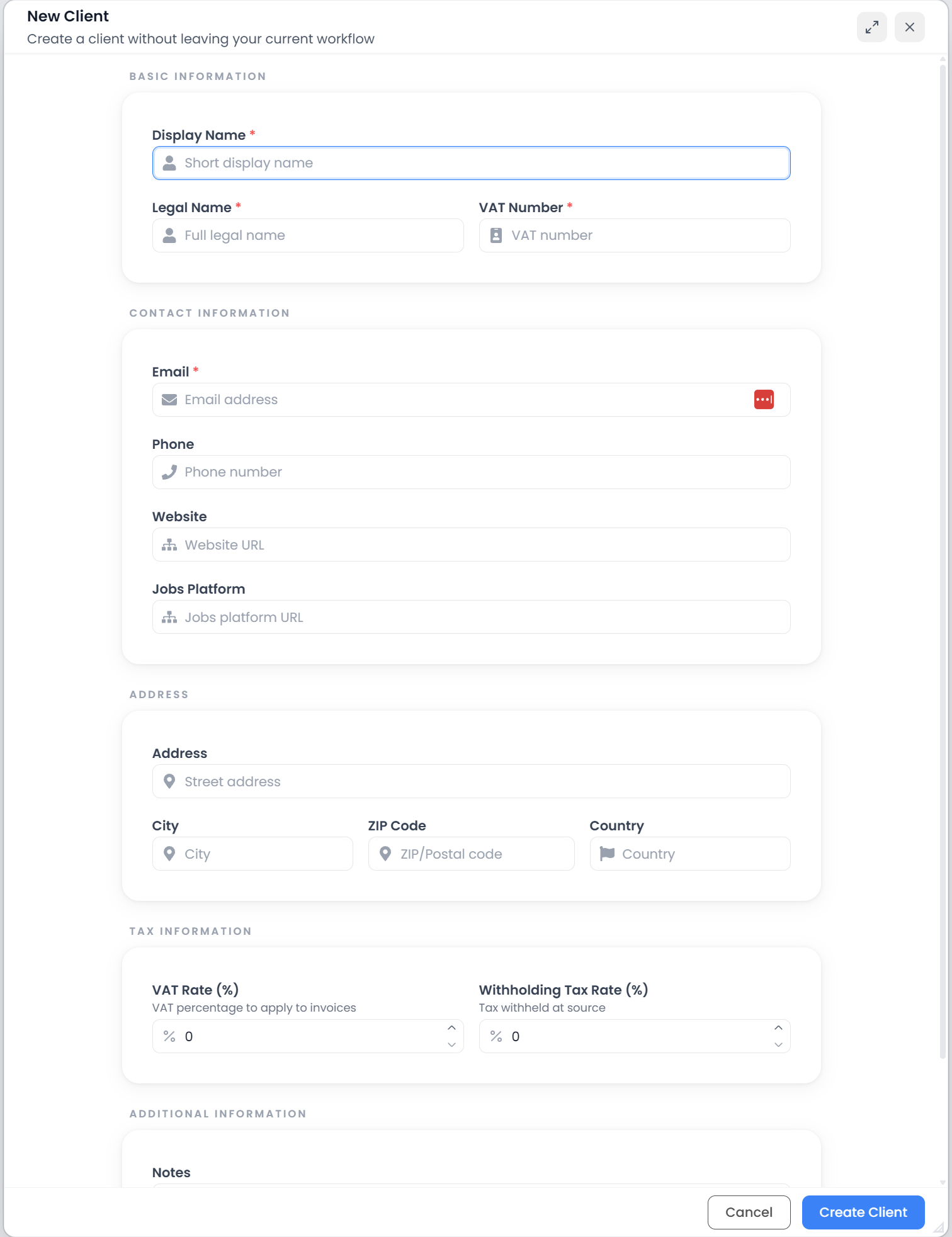
Choose New to create a record. To correct an existing record, use its row's Edit action or the edit button on its details page.
| Field group | What to record |
|---|---|
| Basic information | Display name for finding the client, full legal name, and VAT number |
| Contact | Email, phone, website, and an optional jobs-platform address |
| Address | Street address, city, ZIP/postal code, and country |
| Tax rates | Recorded VAT and withholding percentages |
| Additional information | Notes about the client |
The current form requires Display name, Legal name, Email, and VAT number. Email must have a valid email-address structure. The form checks that the display name, email, and VAT number are not already used by another client. If it reports a duplicate, find and edit the existing record rather than creating another one.
Rates accept values from 0 to 100. An empty rate is treated as zero. Enter the rates you use for that client.
Choose Create or Update to save. Typing in this form does not save each field automatically. Cancel leaves the form without submitting the changes. If the app says the record was saved but the list could not refresh, reopen Clients before trying to create it again.
Where client details and rates are used
The display name identifies the customer in selectors and lists. The legal name, address, VAT number, and contact details supply information for newly created business documents. A jobs-platform address is a reference link; saving it does not connect or synchronize an external job system.
The quotation wizard uses the selected client's VAT rate in its calculation. It does not apply a withholding deduction merely because a withholding rate is recorded here. See Quotation analysis and pricing.
A project reference belongs to a job. It is different from the client's display name and can hold the customer's identifier for that particular assignment.
Find a client and open their work
Use Filters to show the list's search field. Clear the search to restore the list, and check pagination when the client is not on the current page. The table can be sorted by its client, contact, project-count, and revenue columns.
Open the client name or View Details to inspect its contact information, notes, recent projects, and recent quotations. The details request shows up to ten recent projects and five recent quotations; this is not a complete history of every record.
Open an associated project to work on it, or a quotation to inspect that saved offer. Use the full project or quotation list and its client filter when you need a wider history.
What project counts and Revenue mean
Project counts and Revenue describe recorded project information. Revenue adds recorded project prices; it does not show payments received. The client overview's Invoiced and Not Invoiced counts classify project records by their stored status.
The client summary does not provide a currency-by-currency conversion calculation. For work recorded in several currencies, inspect the underlying projects and the Statistics currency controls before treating one displayed total as a comparable amount.
Changing a client after creating a quotation
An existing quotation keeps the seller, client, and job details captured when it was created. Editing the current client record does not rewrite those saved copies or recalculate its totals.
For example, correcting the address here prepares the current customer record for future use; inspect a previously issued quotation separately. See Quotations and translation projects.
Delete a client
Use the row's Delete action and read its confirmation. The current client table uses individual row actions, not a selected-row batch editor. Related records can prevent deletion; use the reported reason to identify the dependency.
Deleting a client is different from clearing the search field or ending a project. Keep the client record when you still need it to identify ongoing work.