
Reusable AI rules
AI rules are saved translation instructions. Use them for behavior you want to repeat across suitable jobs, such as preserving a client's product names or using a particular form of address.
Key points
Create rules through Searchspeare → Rules. Enabled rules are selected by languages and project labels for translation and translation chat. File → Review does not load AI rules; use chat with AI rules included to check those requirements.
They guide Searchspeare translation and translation-chat requests that use the rules. They are different from QA rules, which check text for possible problems after or during work.
AI rule guides
| Task | Guide |
|---|---|
| Write a requirement and a complete example | Create and maintain rules |
| Make rules apply to the intended projects | Languages, labels, and Enabled |
| Understand translation, chat review, File review, and QA | Translation and review behavior |
| Suggest rules from existing bilingual material | Extract rules from context |
The current File → Review workflow does not load saved AI rules. Translation chat can review against them when its AI rules attachment is enabled. The behavior guide explains how to choose the appropriate action.
Create one focused rule
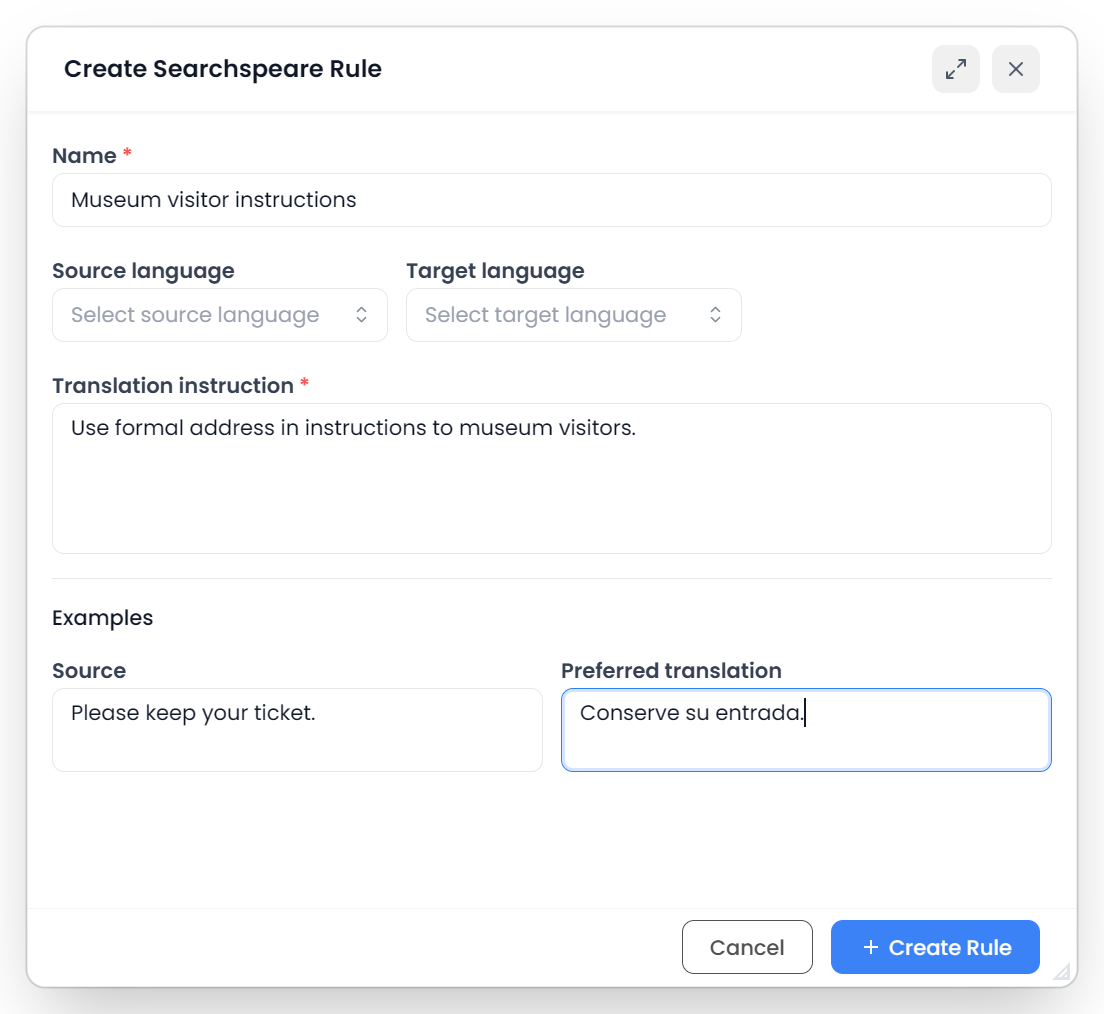
In the editor, open the Searchspeare ribbon tab and choose Rules, then create a new rule in the manager. Enter a short name and one clear translation instruction.
For example:
Keep the product names Atlas Connect and Atlas Sync unchanged. Translate the surrounding sentence normally.
Prefer one behavior per rule. A rule containing product names, punctuation, tone, dates, and exceptions all at once is harder to maintain and test.
Add a complete example pair
Examples are optional, but they help explain the intended result. Supply both a source example and the preferred translation. Completing only one side does not provide a usable pair.
Choose an example that demonstrates the rule rather than merely repeating its description. For a name-preservation rule, use a full sentence containing the name and an actual preferred translation in which it remains unchanged.
Choose the languages and project labels
The source and target language fields determine which translation directions can use the rule. Leaving a language unspecified makes that part of the rule more general. Verify the direction before assuming a rule applies to the reverse translation pair.
When both the rule and project have labels, at least one shared label makes the rule eligible on that criterion. A rule without labels is general. A project without labels does not restrict rules by label, so adding a client label only to the rule is not enough to isolate it from every unlabeled job.
For client-specific guidance, label your projects consistently, inspect the rules eligible for the current project, and disable any that do not belong. Language compatibility and enabled status still apply.
Only enabled rules are included. Disable a rule to keep it saved while temporarily excluding its instruction.
There is no separate per-project attachment list for these rules. Matching is automatic. The Enabled switch changes the reusable rule across eligible projects, while a dimmed inapplicable row in a project's manager reflects that project's scope. See Apply AI rules to projects for examples and regional-language matching.
Test a rule on a few segments
- Check the rule is enabled.
- Check the project languages and any relevant labels.
- Select a small set of segments that should demonstrate the behavior.
- Run the applicable AI translation or ask about the translation in chat.
- Compare the result with the instruction and example.
- Clarify the rule if its scope or wording is ambiguous.
Include an example where the rule should apply and one where it should not. For instance, a product-name rule should not accidentally preserve an ordinary word in an unrelated sentence.
A rule is guidance, not a guarantee of perfect compliance. Check the output before confirming it.
When to use a glossary or QA rule instead
Use a glossary for approved terms and forbidden wording, project instructions for the brief, and QA rules for checks that should flag a result. Use AI rules for reusable translation behavior.
If two instructions conflict, edit or disable one so the requirements agree.