
Searchspeare QA rules
Searchspeare QA is a custom rule type for requirements that need interpretation, such as a required form of address or a narrowly defined style constraint. Describe the problem and provide a concrete example that should fail. Searchspeare prepares a yes/no evaluation question and uses it during QA to report failures.
Use a normal built-in or pattern-based check when the requirement is exact text, a count, or a fixed formatting condition. A narrow, measurable requirement is easier to assess than a general instruction to “make the translation good.”
Create a rule
- Open Quality Assurance → Custom Rules → New Custom Rule.
- Choose Searchspeare QA as the Rule type.
- Give it a specific name.
- Fill What should this rule check? with the failure condition and any exceptions.
- Fill Example that should fail with a source, an incorrect target, and an explanation.
- Choose Prepare and save.
- Reopen the saved rule to inspect How this rule is checked.
- Enable the rule in the custom profile you intend to run.
Preparation can ask you to clarify an unsuitable requirement. Read the feedback and improve the definition instead of assuming that any description will become a useful check.
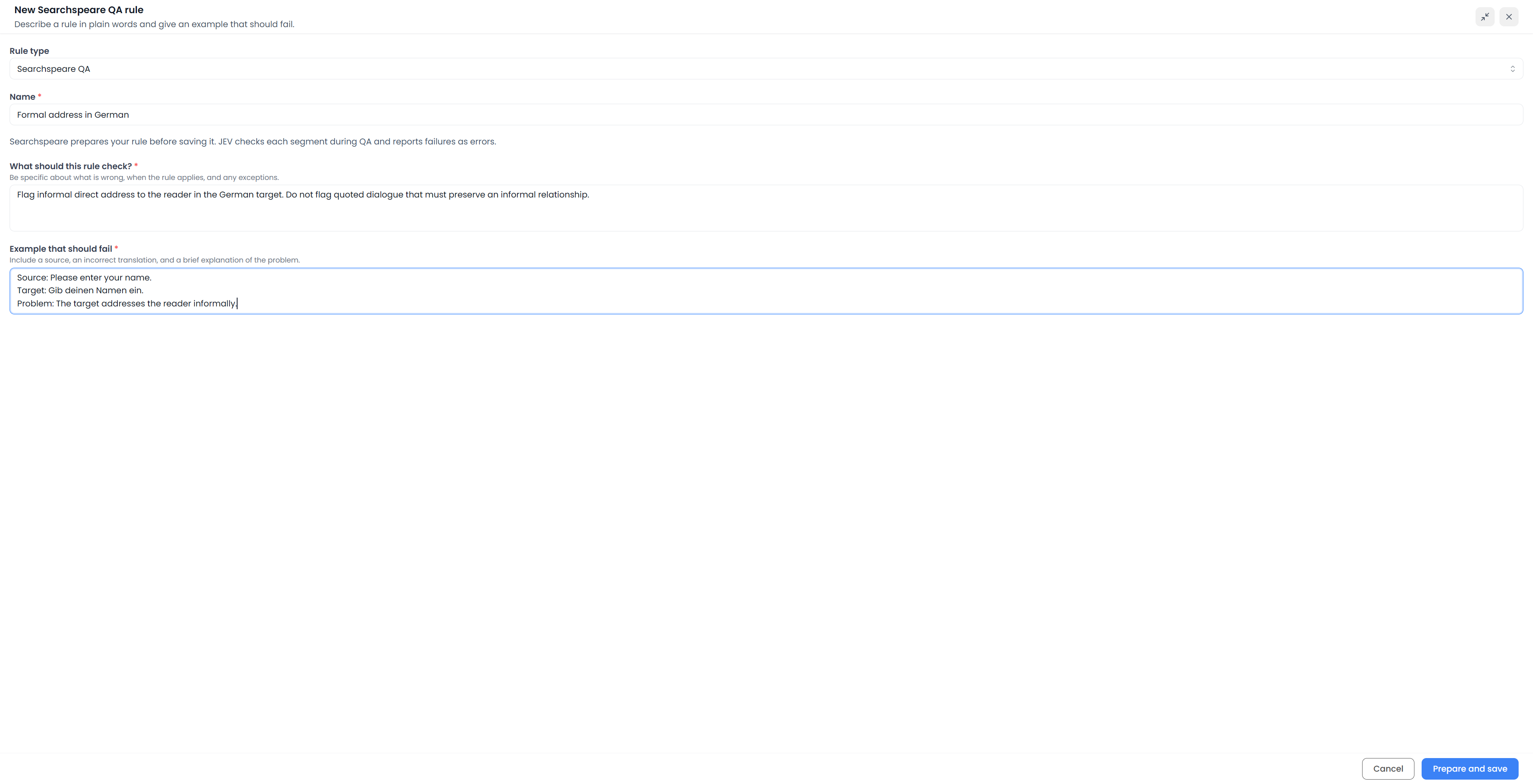
Write a precise requirement
For a formal-address requirement, a useful description might be:
The German target must address the reader formally. Flag informal forms of direct address to the reader. Do not flag quoted dialogue that must preserve an informal relationship.
A failing example could be:
Source: Please enter your name.
Target: Gib deinen Namen ein.
Problem: The target addresses the reader informally, contrary to the required formal instructions.
The example explains what is wrong. An unexplained incorrect sentence leaves the intended distinction unclear. Include an exception in the description when it is part of the requirement, rather than expecting the check to infer a complete client brief.
Inspect the prepared question
How this rule is checked shows the saved evaluation question. A yes answer means a QA error, so the question should describe the violation, not merely a desirable property of the translation.
Read it against the description and failing example. If it tests the wrong distinction, revise the inputs and prepare/save the rule again. You do not edit this question field directly.
Preparation saves the check; it does not run it across the document or prove its accuracy.
Test the rule on a few segments
Test the rule through a QA profile
To test a Searchspeare QA rule, use a small file or saved View containing both errors and valid exceptions. Add the rule to a profile and run QA. The pattern-rule sample tester does not run these AI checks.
Row selection and table filters do not restrict a QA profile run. Open the small file or View itself when you want a controlled trial. Check that genuine violations are reported and valid cases remain acceptable.
Searchspeare QA requires available AI assistance. A profile with these rules can take longer than a standard check collection. If Searchspeare reports that segments changed during evaluation, rerun QA against the latest text before relying on the result.
Read and resolve the findings
When a segment fails a check, the QA list shows the finding under the rule's code and name. A finding may refer to the whole segment without highlighting particular characters.
Inspect the source, target, and requirement. Correct a real violation or ignore a valid exception. A reported failure is an assessment to review, not a replacement already applied to the text.
AI translation rules, QA rules, and correction requests
| Tool | Purpose |
|---|---|
| Searchspeare QA rule | Evaluate an enabled requirement during a QA run and report failures |
| Create rule with Searchspeare in Regex QA | Help author a saved pattern-based check |
| Reusable AI rule | Guide translation or editing behavior when applicable |
A QA rule asks whether the text meets a condition. An AI rule guides how assistance should produce or revise text. Neither automatically changes the other's saved requirements.
For screenshots and a complete walkthrough of the pattern-rule and boundary-rule helpers, read Create rules with Searchspeare. Their Accept action fills the corresponding rule form; Prepare and save in Searchspeare QA creates the different kind of check explained on this page.