
How AI rules affect translation and review
Searchspeare translation and translation chat can use saved AI rules. File → Review does not use them. The table below shows which actions include the rules.
Saving a rule leaves existing text unchanged. Run a translation or chat request to use it.
Which actions use the rules
| Action | Current behavior |
|---|---|
| Searchspeare translation | Loads enabled rules matching the languages and project labels, including their complete examples |
| Translation chat questions and editing requests | Includes matching enabled rules when the chat's AI Rules attachment is enabled |
| File → Review and the selected-segment Review action | Reviews target wording through a separate review workflow; it does not load the saved AI rules |
| QA profile checks | Runs the profile's QA rules; saving an AI translation rule does not add a QA check |
| Memory pretranslation or inserting a stored match | Reuses saved translations; adding an AI rule does not rewrite those saved pairs |
| Manual typing, Find and Replace, or termbase maintenance | Performs the chosen edit; AI rules do not automatically run as validators |
AI rules are also not automatically added to terminology chat as translation instructions. Keep terminology requirements in the appropriate glossary and its properties.
Draft a translation with a rule
- Check applicability in Searchspeare → Rules.
- Select the segments you intend to translate.
- Run the toolbar's Translate action.
- Check the result against the rule's wording and example.
- Edit if necessary, then Confirm when the translation is ready.
Rules do not limit which rows are translated
The toolbar translates selected, visible rows that the action can edit. File → Translate → All empty segments / All unconfirmed segments can also translate rows hidden by filters. AI rules change the translation instructions; they do not change which rows those commands use. Read Selection and scope.
The request includes the matching rules and their examples. Check that the resulting translations follow them. If rules conflict, edit their instructions or change which projects they apply to.
Review existing wording against AI rules in chat
Use translation chat when your purpose is specifically to check existing work against the saved requirements:
- Select a sample segment or small group.
- Open Searchspeare (Chat) in the right-side panel.
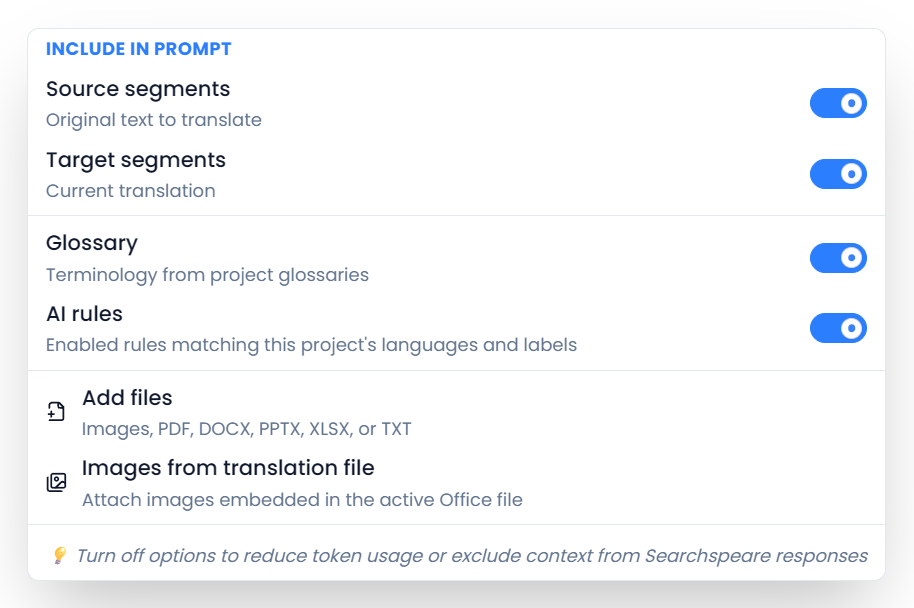
- Open the chat attachment choices and keep AI rules enabled.
- Supply the relevant segment context and ask a precise question, such as “Check these translations against the applicable AI rules and explain any violations.”
- Read the explanation and inspect any proposed edits.
- Apply only the changes you accept, then follow the normal confirmation workflow.
A question can produce an explanation without editing the document. An editing proposal also needs review and application before it changes your working text. Chat and Changes preview explain those steps.
The chat attachment choice is separate from the saved rule's Enabled switch. Turning off AI Rules for chat excludes them from that chat request; it does not disable the saved rules for translation.
Does File → Review use AI rules?
The current File review and segment-toolbar Review actions check the target text through their own review workflow. They do not load the saved AI rules. Use them for the review they offer, then use rule-aware translation chat when you also need an explicit check against your reusable requirements.
Use chat with AI rules enabled when you need to check those requirements. The File ribbon explains its document and filtered review choices.
Create a QA check for a requirement
If you want a listed finding whenever a result violates a requirement, create an appropriate QA check. Pattern rules suit mechanical requirements; Searchspeare QA rules support checks expressed in natural language. A glossary and terminology QA are suitable for approved or forbidden terms.
An AI rule can help produce the intended translation, while a separately configured QA check helps detect a violation. Create both when you need instructions for translation and a separate check of the result.