Quotation analysis and pricing
A raw word count describes the source text analyzed. A weighted-word count is a pricing calculation: it applies your chosen percentages to groups of words. The two counts answer different questions.
For example, 1,000 words at a weight of 20% contribute 200 weighted words. The file still contains those 1,000 source words.
Repetitions and memory-match categories
The analysis considers internal reuse in the supplied files and, when selected, matches in your translation memories. A similar passage can still require careful editing. Its score is not a quality or effort guarantee.
| Category | Meaning for this calculation |
|---|---|
| Context (101–102%) | Matches that also receive a context score above an exact textual match. The result can show separate 101% and 102% rows; both use the Context weight |
| Repetitions | Repeated source wording identified within the analyzed material and assigned to the repetition category |
| Exact (100%) | Exact matches assigned to the 100% category |
| High Fuzzy (95–99%) | Close matches in that similarity range |
| Medium Fuzzy (85–94%) | Matches in that similarity range |
| Low Fuzzy (75–84%) | Matches in that similarity range |
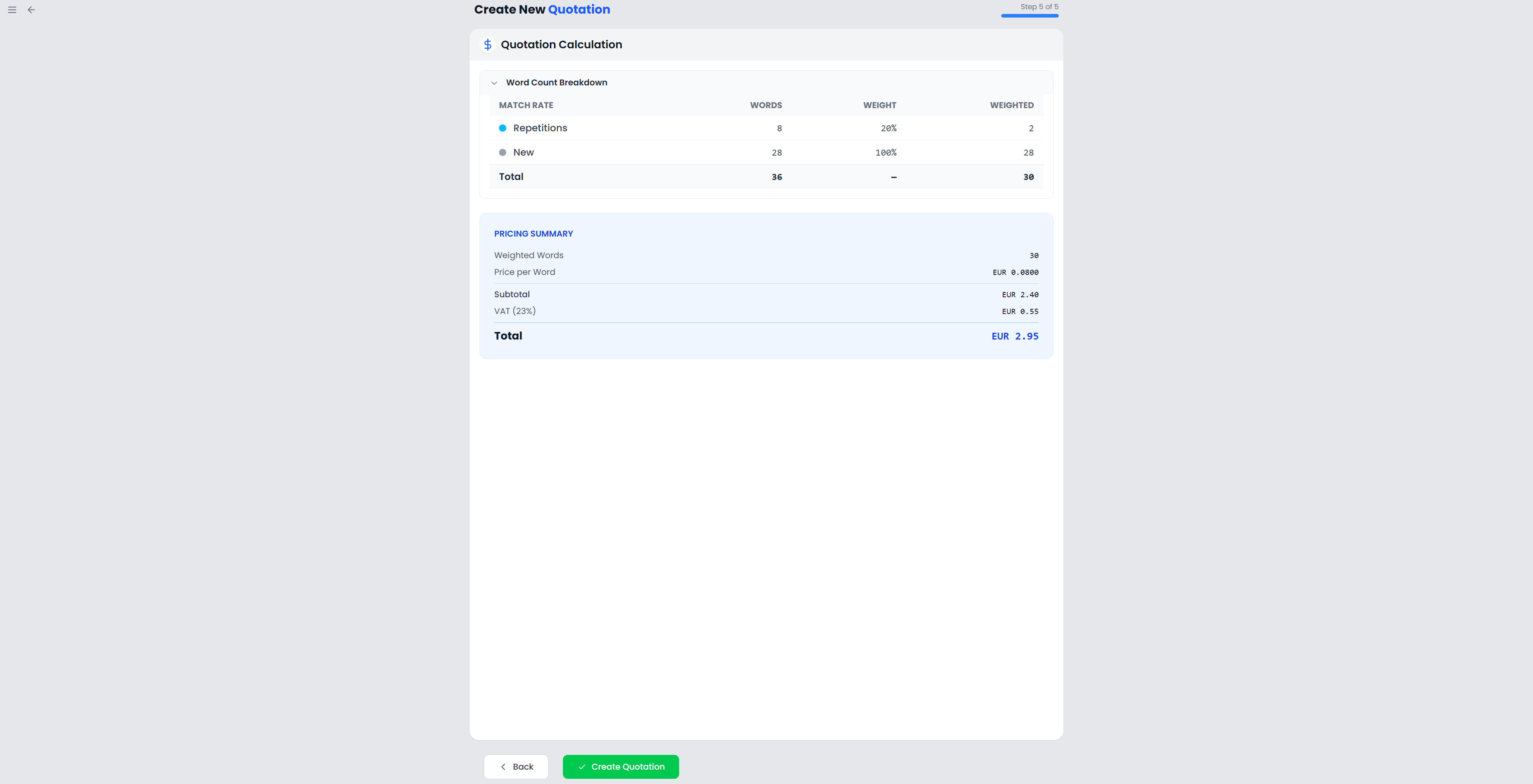
| No Match (0–74%) / New | Text without a qualifying match of at least 75%; the calculation table labels this group New |
Each result contributes to one category. A context-scored result takes precedence over the repetition category. The same words are not added independently to every band they could resemble.
Only selected memories contribute external matches
Selecting different memories can change the categories and price. Without selected memories, analysis still considers internal reuse; it does not automatically search all other memories.
Set the weights
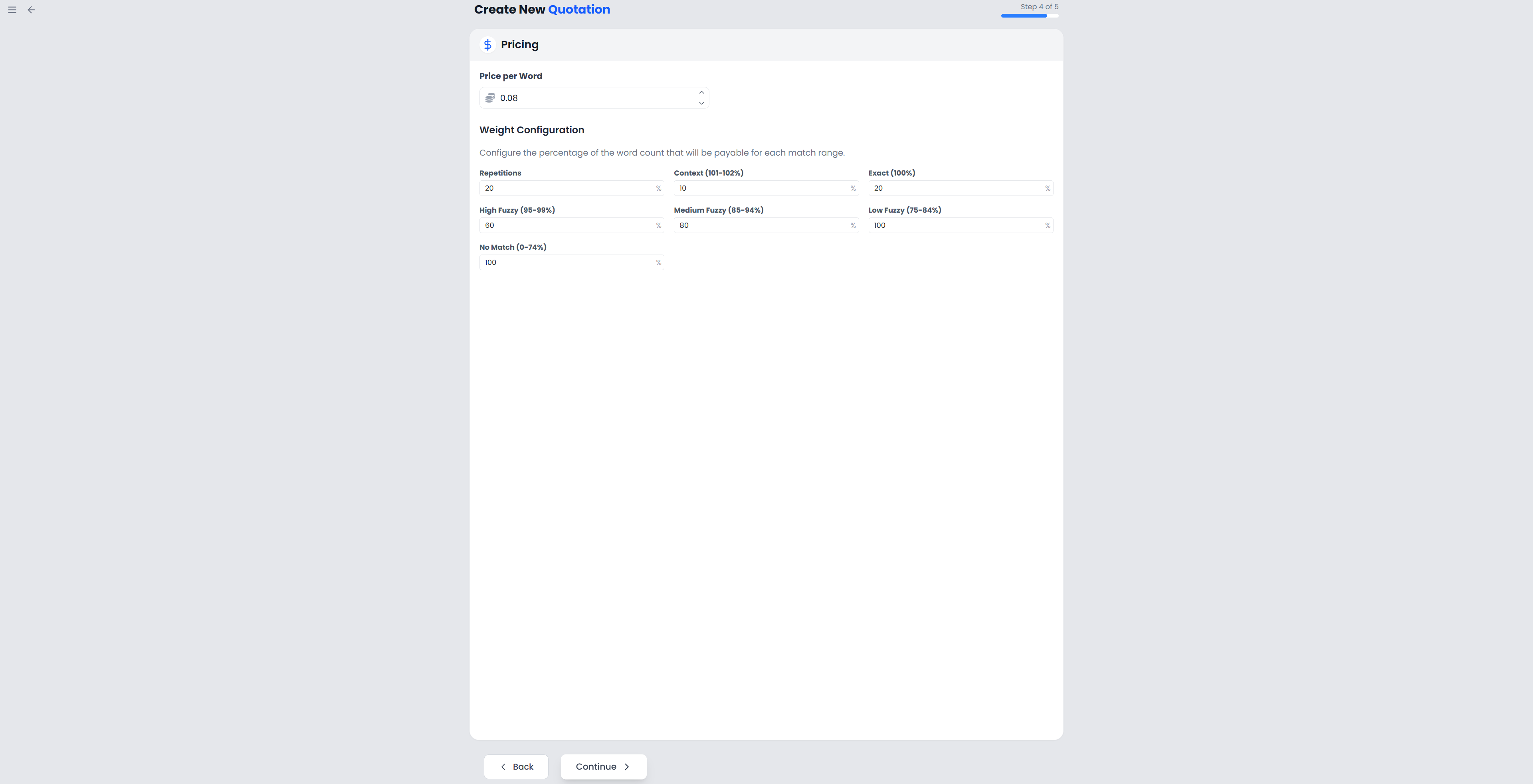
Each weight controls how much of that category's raw word count contributes to the price:
Weighted words for a category = round(raw words × weight / 100)
Total weighted words = sum of the rounded category amounts
Subtotal = total weighted words × price per word
A 0% weight contributes no weighted words. A 100% weight contributes the entire category's count. Setting a weight does not lock, translate, or remove the corresponding segments.
Use the values agreed for this job. The app's initial settings do not establish an agreement with the client or prove how long each category will take to review.
Work through an example
Suppose the analysis gives these results and you choose a price of €0.08 per weighted word:
| Category | Raw words | Chosen weight | Weighted words |
|---|---|---|---|
| Repetitions | 1,000 | 20% | 200 |
| High Fuzzy | 500 | 40% | 200 |
| New | 2,000 | 100% | 2,000 |
| Total | 3,500 | — | 2,400 |
The subtotal is 2,400 × €0.08 = €192.00. If the selected client has a recorded VAT rate of 20%, this calculation adds €38.40 and shows a total of €230.40.
The wizard rounds each result category to a whole weighted word before adding the categories. With fractional contributions, this can differ from rounding only once at the end.
Check what changes the total
Changing the source material, language pair, or selected memories requires a new analysis. Changing weights or the per-word price changes the arithmetic applied to the current results. Changing the selected client can change the VAT rate.
The quotation calculation uses subtotal plus client VAT. It does not apply a separate withholding deduction merely because the client record contains a withholding rate.
Check raw words as well as the final price. An unexpectedly small weighted total can result from a low weight rather than missing source text.
What the saved analysis contains
The saved quotation keeps the total raw words, weighted words, per-word rate, and calculated amounts. Its saved breakdown combines repetitions with exact-match words and combines 101% with 102% context words. It does not retain every original wizard category and custom weight separately.
The DOCX analysis currently prints fixed category-weight labels: 0% for context and exact, 25% for high fuzzy, 60% for medium fuzzy, 75% for low fuzzy, and 100% for new words. These labels can differ from custom weights used in the wizard, even though the saved quotation totals use your calculated amounts.
If the precise custom breakdown forms part of your offer, keep a record of the wizard's results and check or correct the downloaded DOCX's explanatory table before sharing it. See Export and document appearance.